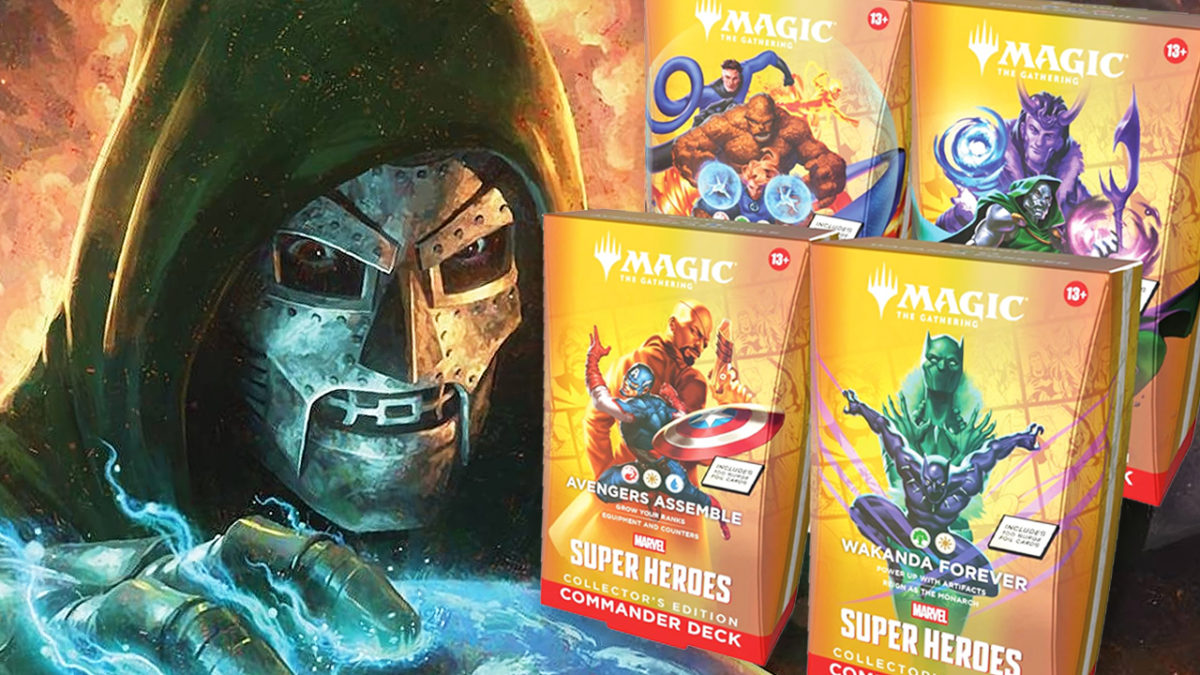
June 2026 will see a Marvel Super Heroes set arrive, and unlike Spider-Man, it’s bringing Commander precons. We’re still waiting for more information about what’s in each, but we’ll update this page as we hear more. Any you’ve got your eye on? Let us know in the comments!
There are four Commander Decks for the Marvel Super Heroes set, following in the footsteps of other Universes Beyond sets like The Lord of the Rings, Warhammer 40,000, and last year’s Final Fantasy.
Here’s the lineup, including the brief description on the box of each precon, as well as their color identity.
Avengers Assemble (Captain America and Nick Fury – Red/White/Blue)
‘Grow your ranks, equipment and counters’
Wakanda Forever (Black Panther – Green/White)
‘Power up with artifacts, reign as the Monarch’
The Fantastic Four (The titular team – Red/Green/White/Blue)
‘Noncreature spells, protection fields’
Doom Prevails (Doctor Doom and Loki – Blue/Black/Red)
‘Connive for power, drain life’
It’s worth noting that Marvel’s Spider-Man, which launched in 2025, didn’t get the Commander Deck treatment. Given it’s Magic’s most popular format, we’re unsure if this is Wizards of the Coast correcting that oversight, or if it was always planned this way.
What’s in the Collector’s Edition Commander Decks?
I’m glad you asked! The Marvel Super Heroes Commander Decks come in another, yellow box version. You’re getting functionally the same cards, except these are all foil.
As the name suggests, you’re probably better off storing these in your collection rather than playing with them, but they command a high price because they’re likely to be a limited printing a la Collector Boosters.
The Lay of the Land In Commander Decks 2026 So Far
Commander precons trailed off last year, with the last two being found in August’s Edge of Eternities set, with none in Spider-Man and Avatar: The Last Airbender.
Adding in the four from the Marvel Super Heroes set, and you’ve got 12 already – with multiple sets still planned for the second half of the year.
By our count, there were 13 in the whole of 2025, so if you’re looking for a way to jump in and play with minimal fuss, this is probably a good year to try your hand.
The highly-anticipated Universes Beyond set Marvel Super Heroes is coming in June, and will be featuring our favorite heroes, villains, locations, and more from the iconic comic books.
It’s out right after Secrets of Strixhaven, and preorders are now live on Amazon, with some boxes already going out of stock. So, I’d act fast if you want to secure the rest of the set on release day.
Lloyd Coombes is an experienced freelancer in tech, gaming and fitness seen at Polygon, Eurogamer, Macworld, TechRadar and many more. He’s a big fan of Magic: The Gathering and other collectible card games, much to his wife’s dismay.
This morning Wizards of the Coast put a new Magic: The Gathering product up for sale with an unexpected twist. The “Prints Charming” Secret Lair drop contains four reprinted cards with pretty excellent new art – but rather than simply telling us how much it costs, it was given five different non-foil store listings and five more for the foil version, each with a different price ranging from $10 all the way up to $50. The product description on all of them is careful to point out the following: “The only difference between listings is the price. Higher-priced listings do not include anything extra.”
This, by my estimation as someone who has been playing Magic since the 90s and literally wrote the announcement for the very first Secret Lair, is pretty lame. Taken graciously, it’s a goofy marketing stunt meant to do something silly and get folk talking about it, but it nevertheless leaves those who arrived too late with a very sour taste in their mouth. A more pessimistic reading would be that WOTC is price testing what people are willing to pay for a Secret Lair drop in broad daylight, shedding even the thinnest veneer that may be hiding the capitalist hunger a lawsuit recently alleged is designed specifically to hide shortfalls in other parts of Hasbro’s business.
The reaction amongst the Magic community has been muddled. Some were confused. Some very generously assumed the higher price points were to bait automated scalper bots into spending more while real people could snag a more affordable version – an argument that doesn’t exactly hold water when you consider that they could just make them all cheaper if that was the desire. And some were just angry, either because the cheapest versions sold out so fast, or because they similarly see this as bold-faced market research in cardboard form.
I actually really love the idea of Wizards of the Coast’s Secret Lair line overall. Directly selling small drops of thematically linked cards with cool and unique art treatments is quite fun, and often comes at little-to-no cost for those who just want to ignore it. Being able to give Kratos or Aloy their own cards without the production lift a larger product would require is a neat tool in WOTC’s toolbelt. The “Chaos Vault” moniker this latest one was released under intentionally pushes the envelope even further with weird, off-schedule ideas and one-offs that are explicitly meant to experiment. I dig that!
But that does not mean Secret Lair is free from criticism. Most pressing here, folk (myself included) were already displeased by WOTC’s 2024 decision to move these drops from a “print to demand” model to one with limited and undisclosed quantities. The former system meant anyone who wanted a certain drop could get it within a specific timeframe, while the latter has historically meant you need to get in line right when a popular drop arrives in order to have a chance at purchasing it – something you can’t do if you, say, have work or school at the same time.
Regardless of intent, the result is a majority of players feeling like they were the ones left holding the bag.
So, given there is already anxiety around the availability of Secret Lairs, one that got almost no pre-promotion offering an early bird discount (alongside the option to pay WOTC more money) is understandably frustrating. It’s the sort of thing that independent creators admittedly do with their products from time to time without drawing any ire, rewarding their most dedicated fans while also providing a way to support them even further for those who want to. But for a multibillion-dollar corporation to do it is not endearing in the same way – it comes across more like profit analysis wearing a sign around its neck that reads “it’s just a prank, bro.”
Much to my dismay, both the lowest and highest priced versions of Prints Charming sold out the quickest, either lending some credence to the “ha ha stupid bots” theory or offering evidence that “speaking with your wallet” is and will always be a doomed suggestion. The standard Secret Lair pricing of $30 for non-foil and $40 for foil lasted much longer than the others, so it seems likely the “stock” for those versions was intentionally the largest of all the options. But even if that does make this one big stunt, or even a cute way to subsidize a few discounted drops through folk who are willing to spend a little more, the ultimate result is still that a majority of players feel like they are the ones left holding the proverbial bag.
I don’t know, maybe I am yelling at the clouds. The card-selling company is experimenting with how much money it can sell its cards for. This should not be a shock, nor am I surprised to see Prints Charming sell out within hours (the art is really excellent, even if its total reprint value of around $5 is not). But the quiet part is being said louder than usual here. The teacher has handed us a test, and I fear what the results will be. The theme of this drop is cards that speed up your green resource production, and if that’s not as on the nose as naming your giant evil space station the Death Star, I don’t know what is.
Tom Marks is IGN’s Associate Reviews Director and local MTG Cube obssessive. He loves puzzles, platformers, puzzle-platformers, and lots more.
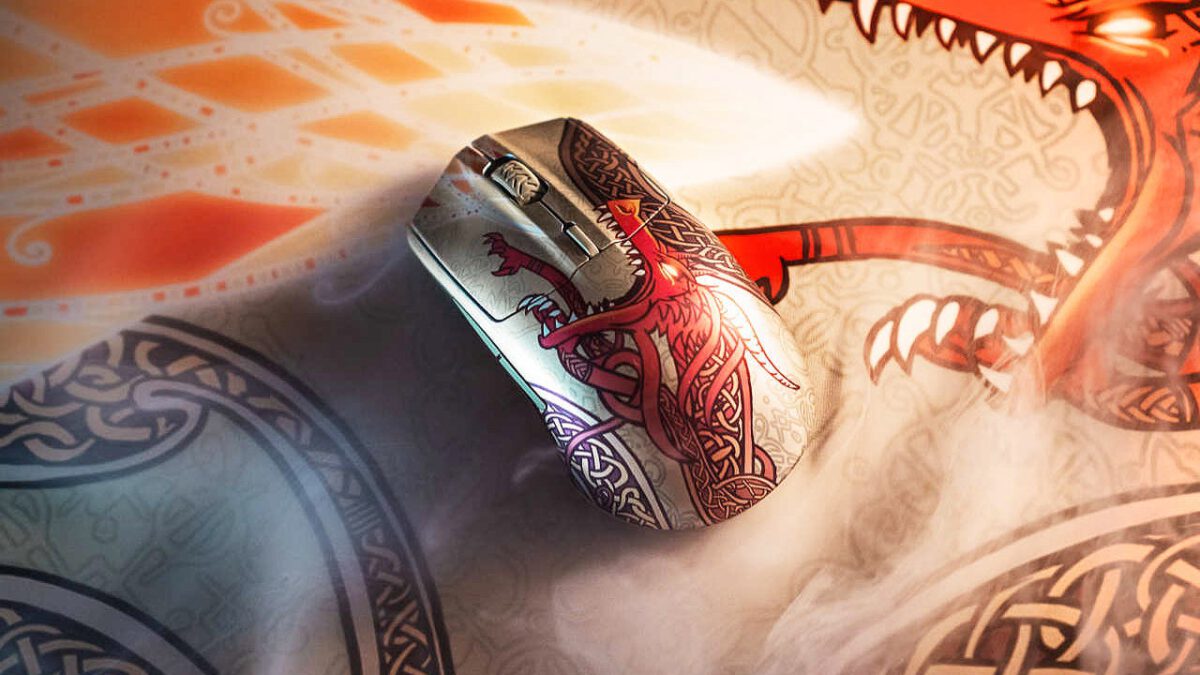
Check out this big price drop on a lightweight gaming mouse with no lack of flair. Starting today, Amazon has dropped the price of the SteelSeries Counter-Strike 2 Dragon Lore Limited Edition wireless gaming mouse to just $56.76 $52.93 after a massive 65% off discount. Historically speaking, the price of this mouse was fixed at $150 since it first released last July… until today. The Dragon Lore Edition gets points for its gorgeous design, but it also happens to be an excellent performer for any gamer looking for a lightweight mouse with top-of-the-line accuracy and precision.
Update: The price has dropped even further.
SteelSeries CS2 Dragon Lore Edition Mouse for $52.93
The SteelSeries CS2 Dragon Lore Edition is based off the venerable Aerox 3 wireless mouse but with a snazzy facelift. Instead of the “holey” honeycomb pattern, the CS2 Edition is kitted with a solid shell adorned with an intricate red and gold dragon illustration that replicates the legendary rare AWP skin in Counter-Strike. Art aside, I actually prefer the solid mouse cover; mice with a bunch of holes in its shells don’t feel as sturdy, naturally, and accumulate dust faster.
Despite losing the honeycomb shell, the CS2 Edition mouse is still very lightweight at 71 grams while still providing all the features you’d want in a premium gaming mouse. It can connect wirelessly two ways: over 2.4GHz WiFi with the dongle (the preferred choice for PC gaming) and Bluetooth. The PixArt co-developed 18K dpi “TrueMove Air” optical sensor offers true 1:1 tracking. The battery lasts up to 200 hours per charge. The mouse buttons are mechanical with a nice clicky sound and are rated for 80 million clicks. At under $60, this is a steal.
Eric Song is the IGN commerce manager in charge of finding the best gaming and tech deals every day. When Eric isn’t hunting for deals for other people at work, he’s hunting for deals for himself during his free time.
Fortnite fans are on the edge of their seats as rumors and leaks seem to suggest a potential Chappell Roan crossover coming to Fortnite in February.
The Femininomenon of the pop music world has been the talk of the Fortnite community since cosmetics related to some of her most iconic songs supposedly leaked late last month. Developer Epic Games hasn’t confirmed whether Chappell Roan or her famous pink pony mascot will actually show up in-game, but fans are still expecting an announcement as soon as this week.
X/Twitter user @itsmeleaky seems to have been the first to kick off rumors that the Midwest Princess was next to join Epic’s roster of Festival stars, sharing images of some very Chappell Roan-looking music cosmetics and what appears to be a llama sidekick dressed up as a pink, cowboy hat-wearing pony. Players were then able to find these same items in a special room in-game, with some other familiar visuals, including flashy pink stars and some knight armor, adding to the pile of alleged evidence.
All three items would certainly fit the occasion, especially the potential sidekick, which looks a lot like a reference to the star’s mega-hit song, Pink Pony Club. The knight armor, meanwhile, has been taken as a sign that at least one of what could be a few skins could pull from Chappell Roan’s medieval-themed Video Music Awards performance of Good Luck, Babe!. She’s known for her many, many memorable looks, though, so music fans are still guessing which direction Epic could take her cosmetics should she have a substantial presence in Fortnite this month.
👀| Fortnite appears to have begun teasing a possible collaboration with Chappell Roan pic.twitter.com/zUMRqjXlxx
Meanwhile, the studio confirmed plans to launch Fortnite version 39.40 this week on January 30, leaving fans to look out for new content in the days ahead. Again, Epic hasn’t confirmed whether the star will show up at all, but for some, it’s not a question of if, but when and how.
Chappell Roan’s status as a Grammy award-winning artist with millions of listeners has many expecting her to headline an upcoming Festival update as its new icon. It would mean potentially multiple skins to accompany the inclusion of more of her music, though how the star’s career could be represented is unclear. It’s possible she could have a more muted presence, but with the previous icon, Lisa, set to rotate out in just a few days, fans believe it could be the perfect time for Chappell to make her proper Fortnite debut.
As Chappell Roan rumors for Fortnite heat up without official confirmation, players are still looking forward to other updates for February. The game’s official account recently put out what appears to be a tease, saying, “In February, Fortnite wears pink.” It could be more evidence that Chappell Roan is on the way, but it’s also likely referencing its upcoming Valentine’s Day plans. Another post from today has music and movie fans looking forward to more KPop Demon Hunters content.
Michael Cripe is a freelance writer with IGN. He’s best known for his work at sites like The Pitch, The Escapist, and OnlySP. Be sure to give him a follow on Bluesky (@mikecripe.bsky.social) and Twitter (@MikeCripe).
This release marks the return to the classic fae and elf-heavy realm of Lorywn, last visited back in 2008. Recently, as I was perusing Instagram, I came across a video by Daniel Powell (aka JollySaintClick), who brought to my attention the new “Mirrorform” card that is part of the latest set.
This card, costing four colorless and two blue mana, reads as follows: “Each nonland permanent you control becomes a copy of target non-aura permanent.” JollySaintClick pointed out how the card can get out of hand with something like Coveted Jewel, and it got me thinking: What other cards would be great to copy with Mirrorform?”
Mirrorform Explained
Before I get into the list, let’s break down a couple of important things about Mirrorform:
It doesn’t say “until the end of the turn” anywhere on the card: Your cards won’t be changing back at the end of your turn, so take care when you drop Mirrorform, and just as important, make sure your hand is set up so you aren’t leaving yourself too restricted after playing it. You don’t want to put yourself in a rough spot after getting all your copies out.
Legendary cards are out (mostly): Because Mirrorform is changing all nonland permanent cards, artifacts like Mirror Box that remove the legend rule will get overwritten, so making copies of legendary cards will be tough, though not impossible. If this is the route you want to take, you will need to find a way to remove the “Legendary” aspect of the creature in question; otherwise, all but one of your copies will be destroyed.
Tokens are okay to copy: Nothing in the card stipulates that your target has to be a nontoken, so just make sure you are aware that if you manage to make a really cool token of something, it is just as viable as anything else.
It’s an instant: While Mirrorform may feel like it should be a sorcery, being an instant means you can cast it outside of your turn or in response to something else. This can be a big help and a great answer to a threat on the board or when you’re the target of an attack.
The Best Cards To Use With Mirrorform
Giggling Skitterspike
Growing up, the spider-doll creature in the original Toy Story terrified me, and thanks to Duskmourn, that critter was turned into a nasty Magic card in the form of the Giggling Skitterspike.
Turning a pool of dull random tokens or boring creatures into indestructible spider dolls that can dish out damage equal to its power to ALL opponents whenever it is targeted is especially scary. The fact that you can boost them to 6/6 with its Monstrosity 5 ability makes the Skitterspike a prime option to use with Mirrorform. Just be prepared for nightmares…
Ouroboroid
Feel like getting some +1/+1 counters? Then Mirrorform some Ouroboroids onto the field, and you will have more counters to hand out than you will know what to do with. Throw in a card like Doubling Season to really up those numbers, and all of these giant space plants will be swarming the battlefield in no time.
Your opponents may give up, so they don’t have to wait for you to tally up all the counters each turn.
Mother of Runes
An army of moms that can give each other protection of whatever colors you want? Sounds good to me! As each creature can be activated separately, this means that you can save their protection and use them on a case-by-case basis, depending on what your opponents do.
If you manage to power up one Mother of Runes and make it stronger, that protection will also let them hit directly at your opponents, too, circumventing their blockers altogether.
Ruin Crab
Honestly, this list could have been all Landfall, but I wanted to restrain myself a bit; Ruin Crab is just too good not to include.
If you are running a deck with some solid token generation, which would be preferred if you are running a copy of Mirrorform period, having a ton of Ruin Crabs on the field will make every single land you drop an immense pain for every one of your opponents, thanks to each trigger of them having to mill on each land drop.
Consuming Aberration
My friends and I still can’t believe that Consuming Aberation isn’t a legendary, but seeing as it matches a color with Mirrorform, this is one of the easiest recommendations on this list.
Similar to Ruin Crab, as it deals with Mill, an army of this horror will not only terrify your opponents from a mill risk, but the massive amount of power and toughness they will all have, due to their strength coming from the number of cards in your opponents’ graveyards. Every little spell you cast will spell terror for your enemies.
Battletide Alchemist
Who needs blockers when you can just prevent all the damage that you get hit with? The Battletide Alchemist Kithkin Cleric has a compounding ability, as each card will be able to prevent more damage on its own from each copy Mirrorform creates, while also multiplying prevention by the number of copies you have.
Even if you only have 5 copies after Mirrorform resolves, that will still mean that each source (not total damage) will need to exceed 25 damage to deal any damage to you.
Miirym, Sentinel Wyrm
Now, before you go into the comments to explain to me how the Legend rule works and how all but a single copy would be destroyed, let me stop you and tell you that yes, you are right.
But we aren’t using Mirrorform on the Miirym; we are using it on a token of Miirym that it itself creates. A token, mind you, that specifically reads (thanks to Miirym’s ability) “Except the Token isn’t legendary”, and as I specifically pointed out earlier, Mirrorform doesn’t stipulate your target has to be nontoken.
So yes, there is a bit of a setup that you will need to do to get this to work, but once you have that non-legendary token out, having multiple copies of each dragon you cast is just far too tempting a proposition to deny.
Roil Elemental
Roil Elemental is another one of those fun Landfall trigger cards that will be great fun to have a ton of copies, but whereas Ruin Crab caused your foes to mill, Roil Elemental instead lets you steal their creatures instead for each land you drop.
The upkeep of keeping track of which copy stole which cards might be annoying, but that delightful feeling of taking that annoying creature of your friends from them will more than make up for it.
Admonition Angel
A bit like Roil Elemental, since it allows you to mess with the board states of your opponents, Admonition Angel has a nasty landfall trigger that allows you to exile any other nonland permanent for as long as the angel remains on the battlefield.
Having a bunch of copies courtesy of Mirrorform would mean a single land allows you to wipe out boards in an instant, and if you have a way to make your permanents indestructible, protecting your copies, then you will really be putting yourself in a solid spot.
The fact that the cards exiled this way have the chance to return should the angel leave the battlefield does give your opponents hope that things can turn around – hope that you can dash with that next land you play.
Relentless Rats
Whereas Battletide Alchemist had a compounding effect that prevents damage, Relentless Rats is a sort of antithesis. Each copy of rats that your Mirrorform makes will empower every other copy that is made, leaving you with a swarm of cute little murderous creatures to sic on your opponents. It’s simple, yet effective.
With tens of thousands of cards in the Magic: The Gathering library, there are hundreds, if not thousands, more cards that would be great options to use with Mirrorform. What are some cards you would want to use with Mirrorform? Sound off in the comments!
Scott White is a freelance contributor to IGN, assisting with tabletop games and guide coverage. Follow him on X/Twitter or Bluesky.
Geoff Keighley has already set Thursday, December 10, as the date for The Game Awards 2026.
The show’s creator and host announced the “save the date” news in a post on social media today. It’s early confirmation for this year’s show, securing its spot at Peacock Theater in Los Angeles nine months before viewers tune into what Keighley has previously referred to as “gaming’s biggest night.”
Gaming fans often spend the months leading up to the award show predicting which titles will take home awards for major categories like Game of the Year, Best Narrative, Best Game Direction, and Best Performance. At just one month into 2026, you’d think there would be no reasonable predictions as far as the winners (and losers) go for this year’s Game Awards, but fans already have one game on their minds: Grand Theft Auto 6.
Rockstar Games has a history of big wins at shows like these (Red Dead Redemption 2 had the most awards at The Game Awards 2018), so the long-in-development sixth mainline GTA game is on everyone’s radar. Other highly anticipated titles, like Resident Evil Requiem, Saros, Fable, and Control Resonant have some expecting steep competition, especially when it comes to the Game of the Year award, but there are a few other issues to consider, too.
Like any other industry award show, The Game Awards has a cutoff date a few weeks before the event itself, keeping some games from being competing despite being released in the year the show is held. For The Game Awards 2025, the cutoff date was November 21, 2025, at 9 p.m. PT / 12 a.m. ET. GTA 6 has a release date of November 19, 2026 – and that’s if it can dodge yet another delay. Meanwhile, with so much time left in the year, there’s a high likelihood at some of the year’s best game may not have even been announced yet.
Today’s announcement arrives less than two months after Keighley hosted The Game Awards 2025 on December 11. The show brought a number of bombshell announcements and reveals, including Divinity, a first look at Leon S. Kennedy in Resident Evil Requiem, two Tomb Raider games, footage from The Super Mario Galaxy Movie, and more. The one-last-thing reveal of the night was a first look at Highguard.
Michael Cripe is a freelance writer with IGN. He’s best known for his work at sites like The Pitch, The Escapist, and OnlySP. Be sure to give him a follow on Bluesky (@mikecripe.bsky.social) and Twitter (@MikeCripe).
Capcom has published a live-action Resident Evil Requiem trailer that showcases our best look yet at the ruins of Raccoon City, a few weeks before players get to explore it for themselves.
The live-action short features Longlegs actress Maika Monroe, who plays a mother living in Raccoon City shortly before its infamous zombie outbreak. Things sadly do not end well for her (or her daughter) in this three-minute short film that is meant to set the scene ahead of Requiem’s arrival.
Fans can now find the short film by scanning QR codes found on viral marketing appearing in New York’s Time Square and around Hollywood. Alternatively, its YouTube link is now live and fans are sharing it around social media:
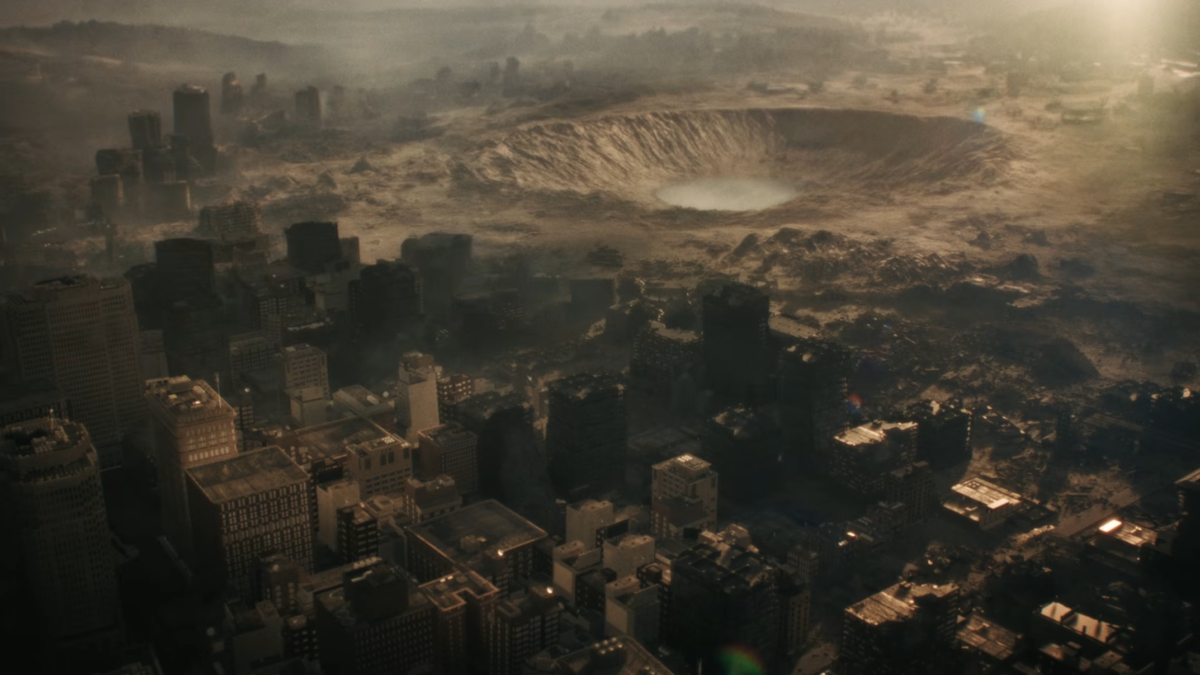
The trailer features cops, dogs, and numerous background actors as zombies. A wide shot shows the huge crater left by the missile strike at the end of Resident Evil 3, designed to ultimately neutralize the city’s undead outbreak. At street level, the city subsequently looks post-apocalyptic, with burnt out cars and part-collapsed skyscrapers as far as the eye can see.
Fans are already discussing the trailer’s end, which features two shadows moving past. Dialogue is then heard saying “That’s the last of them, facility secured,” and then “Copy that, Raccoon City is ours.” These voices certainly don’t sound like Requiem’s leading duo of Leon S. Kennedy and Grace Ashcroft, so who are they? And who has claimed the city now — Umbrella?
Resident Evil fans have known for some time that they will finally get to return to Raccoon City in the series’ upcoming Requiem, which is set to tie-up long-gestating plot threads related to the location and to the shadowy Umbrella Corportation that have been dangling ever since the franchise’s origins. An early trailer for Requiem featured a glimpse at the ruined city, and Leon’s former Raccoon City Police Department headquarters.
How much more will we get to explore? With only a few weeks to go until launch, Capcom seems to have kept much of Resident Evil Requiem under wraps. That said, the game’s director recently made a point of clearing up fan speculation that the game will be open world.
“This year is the 30th anniversary of the Resident Evil series, so it feels like no coincidence that 2026’s Resident Evil Requiem is combining the best ideas of the saga into what appears to be a fantastically constructed tribute to everything that makes the series so great,” IGN wrote in our recent Resident Evil Requiem final preview. “Do you like tense survival horror? It’s here. Wanna go all guns blazing with intense action and a quip-obsessed hero? You get that too.”
Tom Phillips is IGN’s News Editor. You can reach Tom at tom_phillips@ign.com or find him on Bluesky @tomphillipseg.bsky.social
The Mega Evolution set’s Ascended Heroes expansion has quickly become yet another collector-driven Pokémon TCG release, with demand greatly outweighing the supply and maxing out the value of certain cards.
With Mega Evolutions returning in force and Special Illustration Rares pushing presentation to extravagant new heights, the set has created another sharp divide between playable staples and true luxury chase cards.
While not every premium pull is destined for competitive dominance, each of the top ten most expensive cards so far has earned a lofty market price with jaw-dropping artwork, gameplay relevance, pure scarcity, or a combination of the three.
Using the dedicated trading card marketplace TCGplayer, we’ve ranked the 10 most valuable Pokémon cards from Ascended Heroes by their current market price at the time of writing, how their artwork stands out, and why their gameplay impact has kept collectors and competitive players chasing them alike.
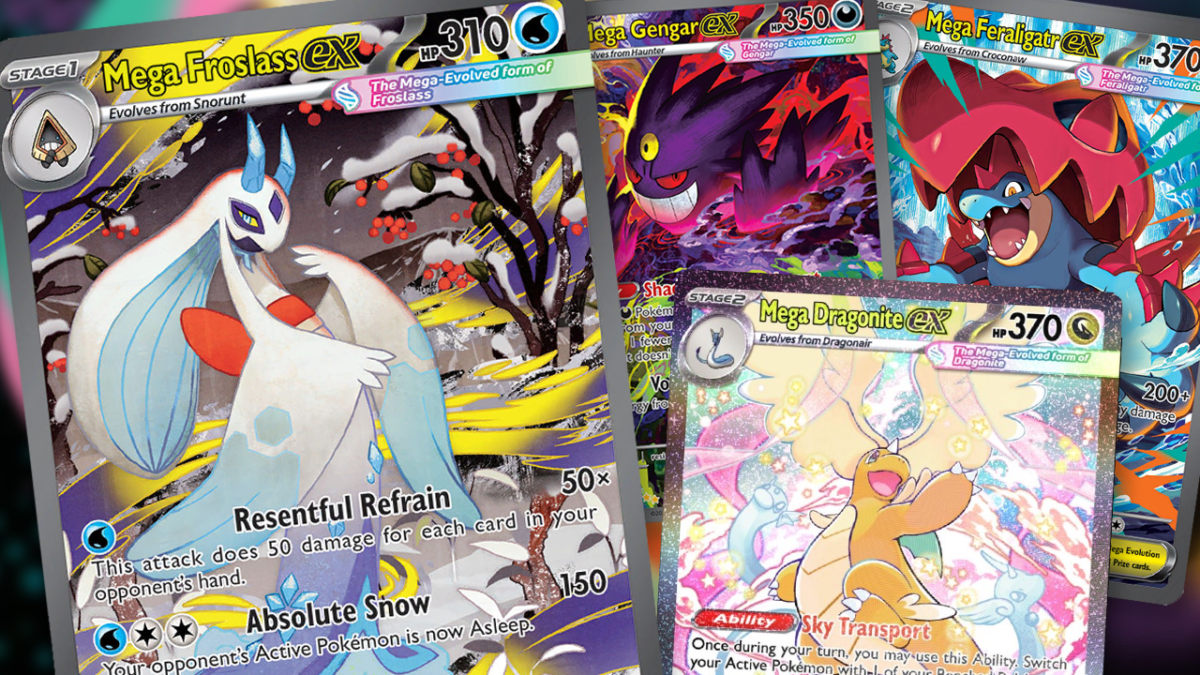
10. Mega Froslass ex (275/217)
Mega Froslass ex may sit at the bottom of this list, but its appeal is far from modest. The artwork leans into icy elegance, placing Froslass against a stark, wintry backdrop that feels painterly rather than action-packed. That sort of subdued aesthetic stands apart from the chaos of other Mega Evolutions, making it a sure favourite among collectors who value atmospheric art over spectacle.
In play, Mega Froslass ex has carved out a niche as a disruptive attacker. Its ability to punish large hands and inflict Sleep introduces awkward sequencing for opponents, particularly in slower, resource-heavy matchups. While not a format-defining threat, its control-oriented design has kept it relevant enough to justify its premium status.
9. N’s Zoroark ex (286/217)
Another of the most valuable Pokémon cards in Ascended Heroes, this Special Illustration Rare thrives on narrative as much as mechanics. The artwork places N alongside Zoroark in a richly detailed scene that echoes the duo’s moral ambiguity, rendered in muted tones that feel almost storybook-like.
Gameplay-wise, N’s Zoroark ex remains a utility powerhouse. Its Trade ability seems like one of the most efficient new draw engines in the game, while Night Joker’s attack-copying effect grants immense flexibility. That versatility should keep Zoroark shells relevant across multiple formats, making this version a collector favourite that still earns its keep at the table.
8. Iono’s Bellibolt ex (279/217)
Few Pokémon cards in Ascended Heroes feel as vibrant as Iono’s Bellibolt ex; bursting with neon colours and cartoony expressions, the artwork mirrors Iono’s on-screen energy perfectly — instantly giving the card the kind of big personality we know her for.
That personality translates cleanly into gameplay, too. Electric Streamer allows relentless Energy acceleration, enabling aggressive Lightning strategies to overwhelm opponents before they stabilise. While Bellibolt ex requires careful management to avoid overextending, as Thunderous Bolt stops it from attacking the next turn, its all-around explosiveness has made it a popular addition.
7. Marnie’s Grimmsnarl ex (287/217)
Dark, brooding, and unapologetically stylish, Marnie’s Grimmsnarl ex delivers one of the expansion’s particularly striking character moments — with Marnie’s defiant look pairing with Grimmsnarl’s looming presence, feeling like a thrilling anime snapshot.
Competitively, Grimmsnarl ex rewards evolution-based strategies with efficient Energy acceleration and reliable spread damage. Its consistency has made it a staple in Darkness archetypes, and the Trainer-Pokémon pairing adds enduring collector appeal beyond raw power.
6. Mega Feraligatr ex (274/217)
Another expensive Pokémon TCG entry from Ascended Heroes, this card feels like pure momentum, with Mega Feraligatr’s erupting from crashing water, all sharp angles and violent motion, perfectly communicating its role as a bruiser.
Mortal Crunch excels at punishing damaged Pokémon, allowing Mega Feraligatr ex to close games with alarming speed once pressure is applied. Its straightforward, punishing design should resonate with players who favour decisive turns and collectors who appreciate its unapologetic ferocity.
5. Lillie’s Clefairy ex (280/217)
Few cards in Ascended Heroes are as emotionally resonant as Lillie’s Clefairy ex. The artwork is soft, joyful, and intimate, capturing a tender moment that stands in deliberate contrast to the set’s more bombastic Megas.
Despite its gentle presentation, Clefairy ex carries surprising competitive weight. Fairy Zone’s Weakness manipulation can completely warp matchups, while Full Moon Rondo scales effectively in Bench-heavy formats. Its blend of charm and tactical impact is expected to keep pushing demand well beyond casual collectors.
4. Mega Diancie ex (282/217)
One of Ascended Heroes’ most bedazzling cards, Mega Diancie ex looks like a gemstone brought to life before going under a Sailor Moon transformation. Like Mega Gardevoir ex in the Mega Evolution base set, the pastel-heavy illustration gives off pure elegance and symmetry, creating one of the most visually refined cards in the set.
Diamond Coat grants meaningful damage reduction, while Garland Ray offers flexible scaling that rewards precise Energy management. Mega Diancie ex will likely find a comfortable role in defensive Psychic builds, and its graceful presentation ensures it remains highly desirable even outside tournament play.
3. Mega Dragonite ex (290/217)
The poster child of Ascended Heroes, it’s no surprise that Mega Dragonite ex is one of the most valuable Pokémon TCG newcomers in the expansions, as well as being a pure joy rendered in colour. The artwork is lively and whimsical in an almost magical tone, depicting Dragonite soaring through a dreamlike sky.
On the battlefield, though, Sky Transport introduces constant positional control, while Ryuno Glide delivers devastating damage with surprising efficiency. Dragonite’s popularity as a Pokémon in general, combined with genuine competitive utility, has made this one of the most sought-after pulls in Ascended Heroes.
2. Mega Charizard Y ex (294/217)
Gold cards rarely divide opinion, but Mega Charizard Y ex embraces the style choice’s excess unapologetically. Like those that came before, this Mega Hyper Rare treatment transforms Charizard into a glowing icon, stripped of detail yet radiating prestige.
Explosion Y hits brutally hard, too, with this singular move capable of swinging games in just one attack. That raw power, paired with Charizard’s evergreen popularity, is likely to keep this card a centrepiece of big collections.
1. Mega Gengar ex (284/217)
The most valuable card among the Pokémon TCG’s new Ascended Heroes expansion, Mega Gengar ex stands at the summit of this expensive top ten. Not only is the artwork grippingly chaotic with five menacing, swirling colours, but Gengar’s predatory grin feels alive within the frame, too.
Gameplay-wise, Mega Gengar ex offers both disruption and efficiency. Shadowy Concealment’s Prize manipulation subtly shifts tempo, while Void Gale enables smooth Energy redistribution. Combined with Ascended Heroes’ extreme scarcity at MSRP and iconic design, it’s little wonder this card commands a near four-figure market price.
Where to Buy Ascended Heroes Sealed Boosters
The Ascended Heroes expansion has officially kicked off Pokémon TCG’s 2026 run, but there are only a couple of places where you can reliably buy ETBs, booster packs, and collections right now. Note, outside of keeping up with deal trackers, you’ll likely have to pay above retail price for the time being.
Ben Williams – IGN freelance contributor with over 10 years of experience covering gaming, tech, film, TV, and anime. Follow him on Twitter/X @BenLevelTen.
A big band remix of Super Mario themes just won a Grammy Award, beating Wicked star Cynthia Erivo to win in the Best Arrangement, Instrumental or A Cappella category.
Featuring tunes from throughout the Mario franchise, from its earliest days through Super Mario Galaxy and beyond, you can listen to the Grammy Award-winning composition below:
Jazz Orchestra ‘8-Bit Big Band’ won a Grammy Award for Best Arrangement, Instrumental, or A Cappella for ‘Super Mario Praise Break’
Once again, this is an entirely unofficial cover, meaning that Nintendo shares none of the glory (other than having created the original tunes in the first place). The tune beat three other tracks to the award, most notably including Cynthia Erivo, who was nominated for her arrangement of original song Be Okay.
“WE JUST WON OUR 2nd GRAMMY 🤯🤯🤯,” The 8-Bit Big Band wrote on social media. “Thank you to everyone who listened and supported to all of our new releases and huge congrats to my co-arrangers on the now Grammy winning Super Mario Praise Break.”
Video game nominations remain a rare occurrence at the Grammys. Back in 2011, Civilization 4 theme song Baba Yetu scooped the Grammy Award for Best Arrangement, Instrumental and Vocals. A year later, Austin Wintory’s soundtrack for Journey became the first video game soundtrack to receive a Grammy nomination in the Best Score Soundtrack For Visual Media category, though that award was ultimately won by The Girl with the Dragon Tattoo.
Since 2023, the Grammy Awards have featured a dedicated video game soundtrack category, at least. This year’s award was another gong for Austin Wintory, who won for his work on Sword of the Sea. Losing out this year were Avatar: Frontiers of Pandora — Secrets of the Spires, Helldivers 2, Indiana Jones and the Great Circle, and Star Wars Outlaws: Wild Card & A Pirate’s Fortune.
Despite cover versions from two of its franchises now being Grammy winners, Nintendo has never officially been nominated itself, despite decades of soundtracks and tunes.
Tom Phillips is IGN’s News Editor. You can reach Tom at tom_phillips@ign.com or find him on Bluesky @tomphillipseg.bsky.social
As part of a “month of anniversary surprises,” Helldivers 2 developer Arrowhead has formally introduced us to the “face of Freedom, the voice of Victory, the light of Liberty… John Helldiver.”
In a fascinating deep dive into the writing and casting of the iconic character, actor Craig Lee Thomas and lead writer Russ Nickel discussed developing the face and voice of the game that the fandom has dubbed, quite rightly, John Helldiver.
“Casting was crazy,” said Russ Nickel, Helldivers 2’s lead writer between 2020 and 2022. “I did all the writing, and then the script went off sort of into the abyss, and I didn’t hear anything for a while. Then I found out that it was going to shoot in a week.
“They actually hadn’t really done any casting. They were just going to use this actor who’s based in Sweden, who was perfectly good, but I was like, ‘This is going to be John Helldiver!’ (I didn’t know that would be his name at the time). We can’t just get someone who’s good! Like, we need to get the funniest person we can possibly find!”
“From the initial audition, you read for what you can as an actor, and you get excited about so many things,” added Thomas, admitting: “But this in particular, as soon as I read it, I was like, ahh, I really, really, really want to do this.” So, with very little notice, he recorded a quick audition tape and sent it off. The video includes Thomas’ audition and even though his portrayal is a little less amusing than we’ve come to expect, there’s no doubting that it’s our John Helldiver.
“Within a couple days, I had gotten self tapes from Craig Lee Thomas, who plays John Helldiver,” Nickel explained. “He’s perfect. I love that man. He’s so good!”
For more, check out the 15-minute featurette on YouTube, complete with insights into the recording and mocap process, and some thoughts from the director of the opening cinematic.
Vikki Blake is a reporter for IGN, as well as a critic, columnist, and consultant with 15+ years experience working with some of the world’s biggest gaming sites and publications. She’s also a Guardian, Spartan, Silent Hillian, Legend, and perpetually High Chaos. Find her at BlueSky.